> For the complete documentation index, see [llms.txt](https://docs.flora.ai/llms.txt). Markdown versions of documentation pages are available by appending `.md` to page URLs; this page is available as [Markdown](https://docs.flora.ai/nodes/3d-node/image-to-3d.md).
# Image to 3D
Reconstruct a 3D model from one reference image or several views of the same object
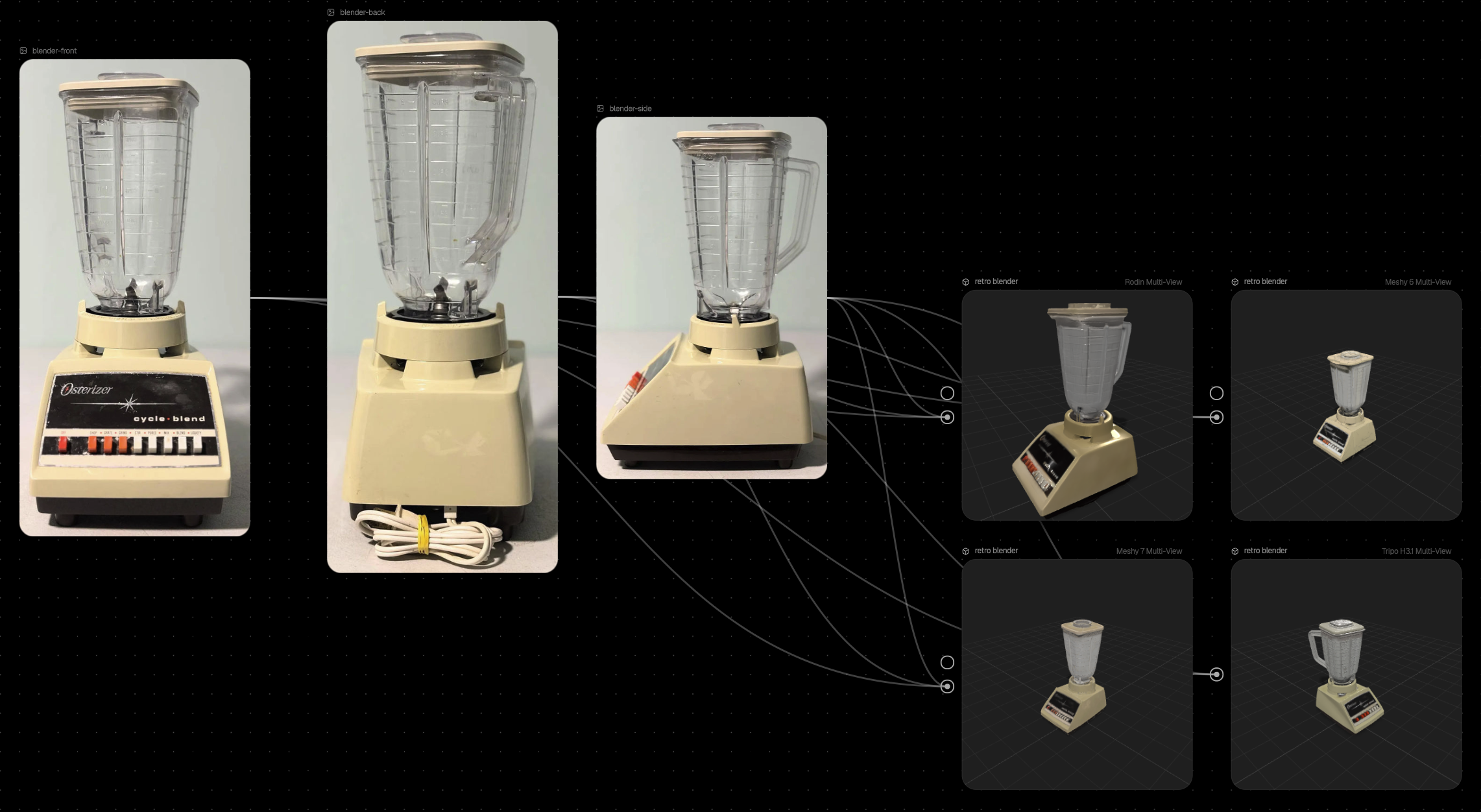
Image to 3D grounds the generated model in a picture you already have. Connect a single reference image for a quick reconstruction, or two to four views of the same object to a **Multi-View** model for higher-fidelity geometry.
## From a Single Image
1. Add a 3D Node and connect an image node (or upload a file) to its image input.
2. Pick a model with image input from the model picker.
3. Optionally add a prompt—some models use it to guide textures.
4. Click **Run**.
For best results, use an image of a single object on a plain background, shot from a slight three-quarter angle so both the front and one side are visible. Reference photos of full scenes or crowded compositions are often rejected by the provider or produce fused geometry.
## From Multiple Views (Multi-View)
Connect two to four images of the same object (Rodin accepts up to five)—shot from different angles—into the node's image input, then select a **Multi-View** model from the picker (for example **Tripo H3.1 Multi-View** or **Meshy 7.1 Multi-View**).
{% hint style="info" %}
Multi-view mode isn't selected automatically—connecting several images to a non-multi-view model just uses one of them. Pick the **Multi-View** variant of your chosen model from the picker yourself. Connect too few or too many images and the Run button tells you what's missing (e.g. "Connect at least 2 images").
{% endhint %}
* **Order matters** for models that expect ordered views (front, back, left, right)—connect images in that order
* **Match lighting and framing** across views so the model can align them
* A **Sheet** capture from another 3D Node produces eight consistent views you can reuse here
## Models
Visit [3D Models](/models/3d-models.md) for the full list of image-input models and which of them offer a Multi-View variant.
---
# Agent Instructions
This documentation is published with GitBook. GitBook is the documentation platform designed so that both humans and AI agents can read, navigate, and reason over technical content effectively. Learn more at gitbook.com.
## Querying This Documentation
If you need additional information that is not directly available in this page, you can query the documentation by asking a question.
Perform an HTTP GET request on the following URL with the `ask` and `goal` query parameters:
```
GET https://docs.flora.ai/nodes/3d-node/image-to-3d.md?ask=&goal=
```
`ask` is the immediate question: it should be specific, self-contained, and written in natural language.
`goal` is what the user is ultimately trying to achieve, the reason they need the answer. Sharing it helps GitBook give you a better, more relevant answer. A goal is most helpful when it describes the outcome the user wants rather than restating the question. For example, with `ask=how do I create an API token`, a goal like `automate deployments from our CI pipeline` lets GitBook tailor the answer to that use case.
The response will contain a direct answer to the question and relevant excerpts and sources from the documentation.
Use this mechanism when the answer is not explicitly present in the current page, you need clarification or additional context, or you want to retrieve related documentation sections.